Prologue · May 17, 2026
The night it started
Late on May 16, 2026, someone important to the author was racing to finish a laptop review that needed a demo of AI running on the machine itself. The only demo anyone could think of was translation. A little after two in the morning, the person who would build AI System 6 sent a message: how about something more interesting?
By four, there was a System 6 interface in the browser. It talked to a model on the same computer through LM Studio; a conversation could be saved as a file, and files could go into folders, the way a desktop works. By half past six there was a note pad, a way to keep pieces of a conversation, and a way to search the web for ideas. That afternoon it was sent over to try, under the name AI System 6.
The spark was an app called AI Desktop 982, which puts chatbots on a Windows 98 desktop. What would a 90s Mac look like instead? And it could double as a place to write.
The next day the real idea was put into words: this is not a nostalgic shell around an AI. A Song of Ice and Fire was written under DOS. The System 6 desktop is there to turn what AI keeps out of sight, its context and its memory, into things you can see on a desk.
Late that same night came one more sentence: this is far too complicated for ordinary people. A good part of the four months since went into proving it wrong. The story starts with that novelist's DOS machine.
01 · 2014
“I don't want any help”
In May 2014, George R.R. Martin went on Conan O'Brien's show and told him about his secret weapon: two computers3. One is for the internet, his email, and his taxes. The other is for writing: a DOS machine that isn't connected to the internet, running WordStar 4.0, from 19874. A Song of Ice and Fire is written on that one.
He likes WordStar, he said, because it does everything he wants a writing program to do, and nothing else. He hates spell check, and the new programs that decide your lowercase letter should have been a capital: “If I wanted a capital, I would have typed a capital.”
“I don't want any help.”George R.R. Martin, 2014
On May 18, 2026, AI System 6 got its first design document, and its first lines are Martin's. What it admired was not old software for its own sake but the manners: stable, predictable, out of the way. No autocorrect, no automatic insertion, no rewriting behind your back. If you want help, you ask.
Its first Read Me was written the same day, and says it plainly: this is not a chatbot with a retro skin but a writing desk. Like WordStar on DOS, or a System 6 machine tuned for writing, it values speed, limits, steady muscle memory, and your control over every thought you choose to keep.
Most of us, unlike Martin, do want a little help now. So the question became: how do you let help in without letting it take the pen?
WordStar gave this desk its manners; a 1988 Mac gave it its shape. A screen of DOS text has nowhere to put the invisible things AI brings with it: which conversation is only temporary, which clip was kept, what the model can see right now. A Mac desktop turns them into things you can point at: disks, floppies, Scrapbook, the Trash. Each chapter below is the story of one of them.
02 · 1984
Scrapbook: only what you chose
On January 24, 1984, the first Macintosh went on sale5. The software that came with it, later called System 1, turned the computer into a desk: a document was an icon you could point at, a folder was something you opened, and what you no longer wanted went in the Trash. In the corner sat seven small things called desk accessories: Alarm Clock, Calculator, Control Panel, Key Caps, Note Pad, Puzzle, and Scrapbook. The whole system took about 216 KB, less than any photo on your phone today.
Scrapbook was the quietest of the seven. Whatever you cut or copied and wanted to keep, you pasted in. It kept what you put there, and made no decisions of its own about what deserved keeping.
Six of the seven are on the AI System 6 desk today: Alarm Clock, Calculator, Control Panel, Note Pad, Puzzle, and Scrapbook. Scrapbook kept its manners, with one addition: every clip remembers the way back to where it came from. Next to it sits Reader. Reader is not a browser; it washes a web page down to clean text for you to read and clip. Reading a whole page does not make it memory. The sentences you clip do.


03 · 1988
Save was something you did
In 1988 came System 67, and with it MultiFinder, which had first appeared a year earlier6: several programs could stay open at once, you moved between them, and each window kept to its own job.
It was slow, and it was honest. A change you hadn't saved was a change that didn't last, and no program wrote a word behind your back. Your work sat on a disk you could name, and floppies carried things in and out. At any moment you knew which things were yours, and where they were.
AI System 6 brought both back as they were. Work that lasts lives on the Project Hard Disk; the PDFs, pages, and recordings you bring in for this piece ride on the File Floppy, as reference that never quietly joins the project. It also set itself a rule just as old-fashioned: everything needed to boot must fit on two 1.44 MB floppies, or the build fails. The heavy tools live on a “third disk” and load only when used.
 Project Hard DiskWhat lasts
 File FloppyWhat you brought in this time
04 · 1994
Let the window step aside
In 1994, a small utility called WindowShade was taken into System 7.58: double-click a title bar and the window rolls up into a strip, right where it was; double-click again and it comes back as it was.
When you write, the reference always ends up covering the draft. Close it and you have to find it again; drag it aside and the desk gets crowded. Every window on AI System 6 can roll up like this. It is not the same as zoom; each does its own job.
The gesture later got a Mac app of its own, also called WindowShade, by the same author, bringing that 1994 double-click back to today's macOS.
05 · 1997
Help, but not on the page
In 1997, Office 97 arrived with an animated assistant9. Type an address, then “Dear”, and up it popped: “It looks like you're writing a letter. Would you like help?”
The intention was kind. The trouble was where it stood: right on top of the page, at the very moment you were still working out what to say. Many people found it maddening. The next version of Office turned it off by default, and by 2007 it was gone altogether.
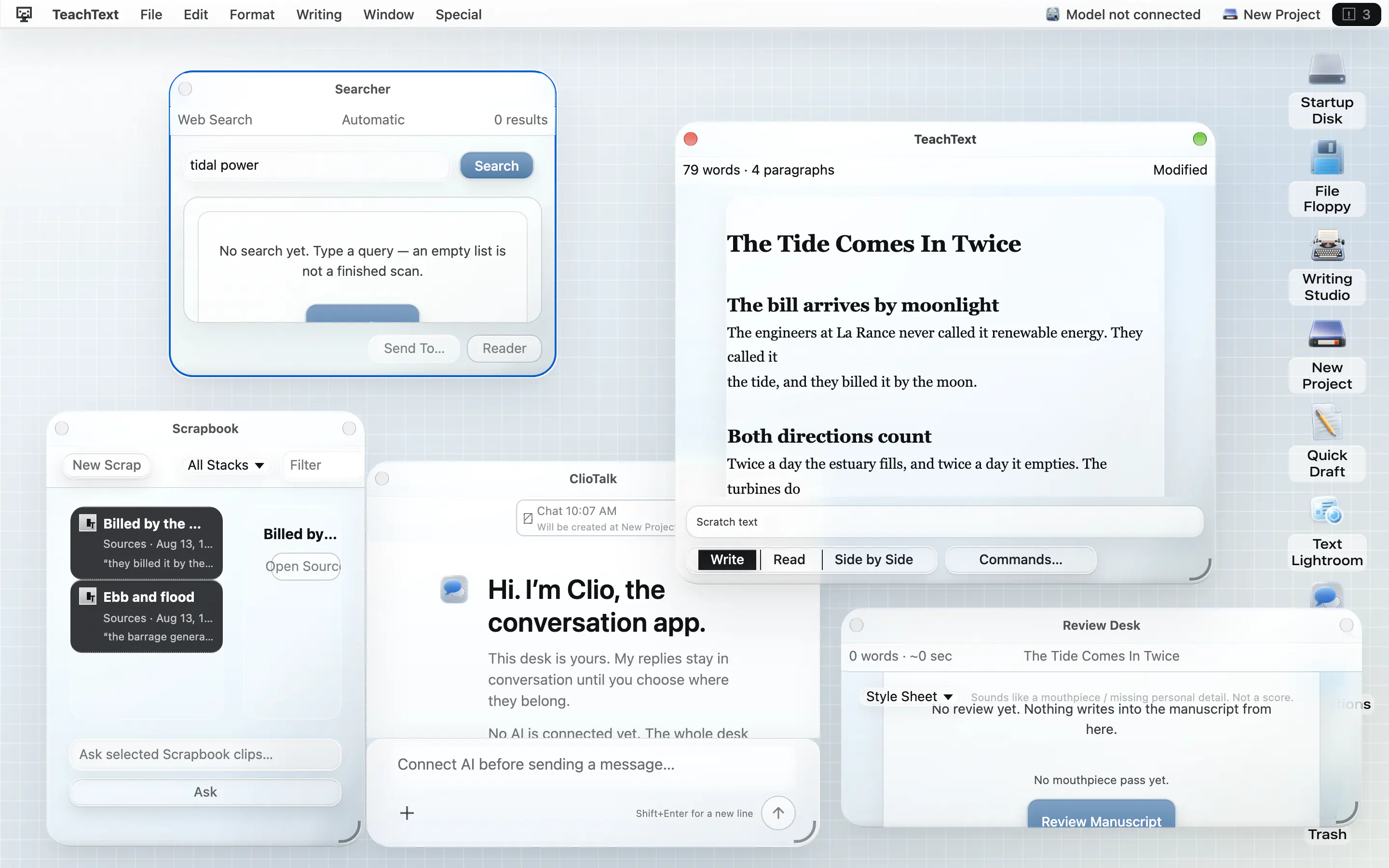
So the model on AI System 6 lives in a window of its own, ClioTalk, and what it writes stays there first. Dictation Pad keeps the same rule: when you finish speaking, it shows you what it heard and asks where the words should go. They never slip into the manuscript on their own.
“It looks like you're writing a letter.”
06 · 2001 → 2026
The material kept changing
On March 24, 2001, Mac OS X went on sale11. It was built on NeXTSTEP7, and brought Aqua's gloss and the Dock. After that the windows went flat, then round, and today they are glass.
What changed was the material. A file stayed a file, the Trash stayed the Trash, and Save kept its meaning. AI System 6 wears seven of those eras, from 1988 to 2026, to test one thing: whether those rules survive a change of clothes.
 1988System 6
 1999Platinum
 2002Aqua
 2009Snow Leopard
 2014Yosemite
 2020Big Sur
 2026Liquid Glass
07 · 2022 → 2026
The computer started writing
On November 30, 2022, ChatGPT was released12. Before long, “could you fix this for me” stopped being a polite request and became something many people do every day.
This time the helper doesn't stand on the page. It has a conversation of its own, and politely hands you a paragraph. But the paragraph looks exactly like yours, and after one copy the two can no longer be told apart. The conversation slowly becomes where things live, too: the sources, the drafts, the decisions. So the old question comes back, harder than before: which of these words are mine?
AI System 6 put one thing at each end. At the start there is the Question Sheet: before any prose, you write down your own questions, the details you saw yourself, the objection you expect. The more specific the human material, the less room the model has to fill with a generic voice. At the end there is Review Desk: before the work leaves, it reads it back to you, and points out the shaky facts and the sentences that have started to sound like a model.
By June it had become a writing tool made to measure for that same person: one makes the creative calls, the other brings the research, and neither hand should be sanded down into generic prose. When Review Desk looks for sentences that have started to sound like a model, that is what it is guarding.
In between are the manners of Martin's computer, plus one window for the model:
- Work that lasts lives on the Project Hard Disk.
- What you bring in for this piece rides on the File Floppy.
- Save, clip, insert, export: each one is a key you press.
- The model lives in ClioTalk, and what it writes stays in that window until you carry it out.
- No autocorrect, no automatic insertion, no rewriting behind your back. If you want help, you ask.
Coda
One thing left undone
System 6 came with a small tool called MacroMaker10. It looked like a tape recorder: press record, go through a few steps, and it remembered them; press a key next time, and it did them again. That was also its weakness. It remembered where the mouse had clicked, so once a window moved, the click landed on nothing. From System 7 on, AppleScript took its place.
The last line of AI System 6's first roadmap is its descendant: take a few steps you did yourself, such as search, clip, and insert, and keep them as a small ritual you can run again with one key. As the roadmap puts it, it would remember what was done to which object, not where the mouse was; every run would leave a plain-language note of what it did, with an undo wherever one is possible; and it would never repeat itself on a schedule behind your back.
It is still not built. In four months a great deal has arrived on the desk, and this has stayed at the end of the list. Now that AI that acts on its own is everywhere, the desk wants to hold on to one thing first: every action taken for you is one you can see, and one you can stop.
The rules that made a slow computer clear
are the ones that keep a fast one honest.